The Configuration page contains the following tabs, where you can configure Dr.Web for Unix Internet gateways operation:
•Actions Applied to Threats, where you can specify actions to be applied to detected threats of different types.
•Logging, where you can adjust logging settings
•Content Filter, where you can configure blocking of web pages by their content type.
•System settings , where you can configure user-defined black and white lists of Internet resources, specify paths to the license key file and quarantine directory, as well as configure administrator notification settings.
•Traffic Filtering Rules, where you can specify rules to process files depending on their type and size.
|
If Dr.Web for Unix Internet gateways operates in the central protection mode, the administrator of the central protection server can block an option to adjust the settings. If so, users cannot configure Dr.Web for Unix Internet gateways settings. |

To adjust the settings, either select required parameter values from the drop-down lists or type the values in the corresponding text fields. If it is required to add another value, click  . After you change a parameter value, you can immediately undo the change by clicking
  or restore the default value by clicking
  .
.
To view the changes, click Preview. On the open page, you can choose whether or not to save the adjustments (to undo a change, clear the corresponding checkbox). To continue adjusting the settings, click Continue Editing and the previous page will open. To cancel all of the changes, click Cancel changes. To save the changes, click either Save or Apply and Save.
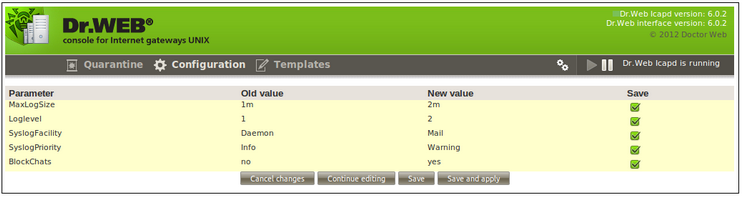
Figure 24. Preview page
After you click either the Save or Apply and Save button, notification on the configuration being saved displays on the screen. Click the notification to return to the settings page.