This Manual describes the following anti-virus software (version 6.0.2):
•Dr.Web® Anti-virus for Unix Internet gateways for Linux;
•Dr.Web® Anti-virus for Unix Internet gateways for FreeBSD;
•Dr.Web® Anti-virus for Unix Internet gateways for Solaris x86.
As far as all these solutions for UNIX systems differ from each other only slightly, all of them will be referred to as Dr.Web for Unix Internet gateways. Critical differences are described in the corresponding chapters and paragraphs.
The manual is designed for a person responsible for anti-virus protection and security ("Administrator" hereinafter).
Protection of Internet gateways in UNIX systems has the following features:
•Monitoring of all incoming HTTP and FTP traffic to provide virus detection and neutralization.
In most cases, viruses are not directly aimed at UNIX systems. For example, through the Internet ordinary Windows viruses are distributed, including macro viruses for Word, Excel and other MS Office applications.
•Filtration of access to HTML resources by their MIME type, size and host name.
•Restriction of access to Internet resources according to the black lists that are regularly updated.
Dr.Web for Unix Internet gateways solution consists of three major components and performs all of the tasks mentioned above.
Dr.Web for Unix Internet gateways includes the following components:
•Dr.Web Scanner - console anti-virus scanner that provides detection and neutralization of viruses on the local machine and in the shared directories;
•Dr.Web Daemon - a background that performs functions of an external anti-virus filter;
•Dr.Web Monitor - a resident component that runs and terminates other Dr.Web modules in the required order;
•Dr.Web Agent - a resident component that helps to configure and manage Dr.Web components, gathers statistics and provides integration with Dr.Web Enterprise Security Suite (Dr.Web ESS);
|
By default, the solution includes Dr.Web Agent, designed for integration with Dr.Web ESS 6.0. If you want to integrate the suite with Dr.Web ESS 10.0, install the updates for Dr.Web Agent and perform additional configuration steps. For details, refer to the Dr.Web Agent section. |

•Dr.Web Engine and virus databases that are regularly updated;
•Dr.Web Updater (implemented as a Perl script) - a component that provides regular updates to virus databases;
•Dr.Web ICAP Daemon (hereinafter Dr.Web ICAPD) allows to integrate other Dr.Web components with HTTP/FTP-proxy server using ICAP protocol;
•Dr.Web Console for UNIX Internet Gateways – web management interface, a Webmin built-in module, used for Dr.Web for Unix Internet gateways management and configuration via the web interface from any browser.
The following picture shows the structure of Dr.Web for Unix Internet gateways and its components.
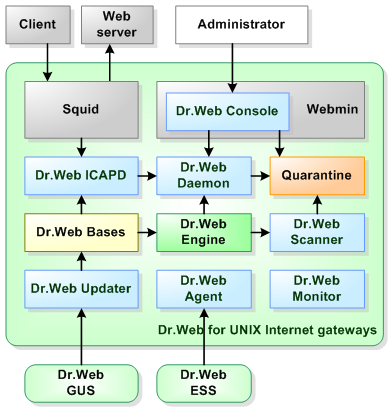
Figure 1. Structure of Dr.Web for Unix Internet gateways and its components
The present manual provides information on setup, configuration, and usage of Dr.Web for Unix Internet gateways, that is:
•General product description
•Installation of Dr.Web for Unix Internet gateways
•Running Dr.Web for Unix Internet gateways
•Usage of Dr.Web Updater
•Usage of Dr.Web Agent
•Usage of console scanner Dr.Web Scanner
•Usage of background on-demand scanner Dr.Web Daemon
•Usage of Dr.Web Monitor
•Usage of module Dr.Web ICAPD
At the end of this manual, you can find contact information for technical support.
Doctor Web products are constantly developed. Updates to virus databases are issued daily or even several times a day. New product versions appear. They include enhancements to detection methods, as well as to the means of integration with UNIX systems. Moreover, the list of applications compatible with Doctor Web is constantly expanding. Therefore, some settings and functions described in this Manual can slightly differ from those in the current program version. For details on updated program features, refer to the documentation delivered with an update.